發表文章

目前顯示的是有「network」標籤的文章

Linux Performance 效能評估工具

圖片
這個文章說明了系統個連接點的效能評估工具與方式。 http://www.brendangregg.com/linuxperf.html netflix 工程師先透過 10 個工具在 60 秒告訴你,系統的效能摘要狀況... http://techblog.netflix.com/2015/11/linux-performance-analysis-in-60s.html 接下來要仔細的分析效能上面的問題,透過 Brendan’s Linux Performance Tools tutorial 的這一篇文章來解釋。 每個指令都是獨有專精的效能評估工具 例如 : perf https://perf.wiki.kernel.org/index.php/Main_Page 他是可以顯示CPU 上面資訊的計數器 及分析軟體、硬體的性能。 http://wiki.csie.ncku.edu.tw/embedded/perf-tutorial    成大資工WIKI 看起來就是折磨研究生的工具,但是工程師的好朋友。(泣...) 其他就慢慢研究,遇到再來使用了。

STOMP/MQTT 通訊協定的測試心得(client/server)

圖片
STOMP 通訊協定的測試心得(client/server) STOMP 是啥東西?  STOMP 是 Simple (or Streaming) Text Oriented Message Protocol 的縮寫 主要提供一個可以操作的通訊界面,可以支援不同平台的的客戶端交換文字訊息。它屬於一個訊息導向的中介軟體。這個服務類似 HTTP ,並且架構於 TCP 上面。 ref: https://segmentfault.com/a/1190000004906137 功能示意圖 用來搭建 IM (即時通訊服務) 是很簡單好用的中介工具 https://segmentfault.com/a/1190000004906137  這裡有目前常見的訊息中介軟體的比較介紹 amqp mqtt or stomp http://blogs.vmware.com/vfabric/2013/02/choosing-your-messaging-protocol-amqp-mqtt-or-stomp.html 建議和 html5 websocket 一起看,比較容易理解它到底再做啥? P66 頁開始。 http://www.slideshare.net/peterlubbers/html5-real-time-and-websocket/94-Learn_More_HTML5_User_Groups 這裡有 function 功能規格說明 https://mq.java.net/4.4-content/stomp-funcspec.html 這個大概就是目前的官方網站了 https://github.com/stomp-php/stomp-php/wiki 這個服務主要構過 broker 來提供服務,目前 broker 的軟體有很多種可以提供。 broker -- STOMP Servers broker -- STOMP Servers 的列表,常用的。 https://stomp.github.io/implementations.html 我裡以 apache apollo 這套 activemq 的子專案,來做說明。 Apollo 1.7.1 版本,下載我是以 Linux 版來說明 http:...

Linux command 測試網路速度

Linux command 測試網路速度 原始碼 in https://github.com/sivel/speedtest-cli # 安裝及執行 wget -O speedtest-cli https://raw.github.com/sivel/speedtest-cli/master/speedtest_cli.py chmod +x speedtest-cli ./speedtest-cli # 執行範例 [root@dev dl]# ./speedtest-cli Retrieving speedtest.net configuration... Retrieving speedtest.net server list... Testing from TANet (111.111.11.111)... Selecting best server based on latency... Hosted by Chief Telecom (Changhua) [67.67 km]: 19.85 ms Testing download speed........................................ Download: 798.55 Mbit/s Testing upload speed.................................................. Upload: 185.07 Mbit/s

PostgreSQL 9.4 in CentOS Linux 7 簡易安裝教學

圖片
PostgreSQL 9.4 in CentOS Linux 7 # 安裝下載 http://www.postgresql.org/download/linux/redhat/ # 安裝 REPO 來源檔 yum install http://yum.postgresql.org/9.4/redhat/rhel-6-x86_64/pgdg-redhat94-9.4-1.noarch.rpm  -y # 安裝主要資料庫程式 yum install postgresql94-server postgresql94-contrib -y /usr/pgsql-9.4/bin/postgresql94-setup initdb systemctl enable postgresql-9.4.service systemctl start postgresql-9.4.service # 裝好後所有的設定檔及紀錄檔都在 /var/lib/pgsql 這個目錄內 [root@c7 ~]# ls /var/lib/pgsql -la total 8 drwx------.  3 postgres postgres   36 Mar 23 09:27 . drwxr-xr-x. 70 root     root     4096 Mar 23 09:27 .. drwx------.  4 postgres postgres   48 Mar 23 09:27 9.4 -rwx------.  1 postgres postgres  267 Mar 23 09:27 .bash_profile # 確認帳號 [root@c7 ~]# id postgres uid=26(postgres) gid=26(postgres) groups=26(postgres) # 切換使用者,並且登入系統設定 [root@c7 ~]# su - postgres -bash-4.2$ psql template1 psql (9.4.6) Type "help" for help. # 建立一個使用者為 mtchang ...

CentOS 7 上 cacti 流量報表管理系統的安裝

圖片
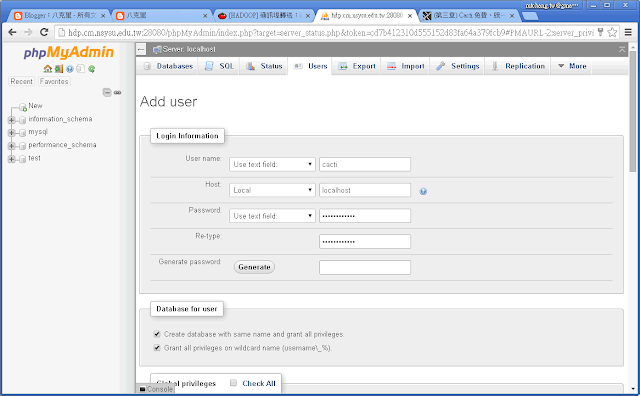
CACTI 是一個結合 snmp 及 rrdtool 的流量報表管理工具,可以大量監控所有的流量報表。 使用前請先安裝及設定好 1. MariaDB http://blog.jangmt.com/2015/09/mariadb-root-in-centos-linux-7.html 2. httpd and phpmyadmin http://blog.jangmt.com/2015/09/centos-7-phpmyadmin.html  3. 主機的 snmpd 服務 http://blog.jangmt.com/2015/09/centos-7-snmpd-centos-7-snmp-install.html ---- CACTI install ---- # 直接使用 yum 安裝 [root@hnamenode2 snmp]# yum install cacti -y [root@hnamenode2 cacti]# pwd /etc/cacti # 安裝號後,請觀看 db.php 的設定值,建立一個 cacti 帳號 [root@hnamenode2 cacti]# cat /etc/cacti/db.php /* make sure these values refect your actual database/host/user/password */ $database_type = "mysql"; $database_default = "cacti"; $database_hostname = "localhost"; $database_username = "cacti"; $database_password = "cactiuser"; $database_port = "3306"; $database_ssl = false; /*    Edit this to point to the default URL of your Cacti install    ex: if your cacti install as at http://ser...

在 CentOS 7 安裝 snmpd 服務(CentOS 7 SNMP install)

---- 在 CentOS 7 安裝 snmpd 服務(CentOS 7 SNMP install) ---- 在 CentOS 7 安裝 snmpd 服務,讓主機的資訊可以透過網路取得。 環境是 CentOS 7 x86_64 版本防火牆已經關閉, SELINUX 設定為 permissive [root@hnamenode2 snmp]# getenforce Permissive # 安裝 snmpd 元件 [root@hnamenode2 ~]# yum -y install net-snmp net-snmp-utils # 修改設定檔,更換為底下資訊 [root@hnamenode2 snmp]# cat /etc/snmp/snmpd.conf # snmp 存取資訊 com2sec local           localhost       public com2sec localnet         192.168.0.0/16  public(public建議修改為其他的帳號) group   MyRWGroup v1            local group   MyROGroup v1            localnet group   MyROSystem v1           local group   MyROSystem v2c          local group   MyROSystem usm          local group   MyROGroup v1            localnet group   MyROGr...

CentOS Linux 7 xRDP (Linux RDP遠端桌面)

圖片
---- CentOS Linux 7 xRDP  (Linux RDP遠端桌面) ---- # 安裝 nux repo source 及 epel REPO [root@hnamenode2 ~]# yum install epel-release -y [root@hnamenode2 ~]# rpm -Uvh http://li.nux.ro/download/nux/dextop/el7/x86_64/nux-dextop-release-0-1.el7.nux.noarch.rpm # 安裝 xrdp [root@hnamenode2 ~]# yum -y install xrdp tigervnc-server # 啟動 xrdp [root@hnamenode2 ~]#   systemctl restart xrdp.service # 觀看啟動的狀態 [root@hnamenode2 ~]# netstat -antup | grep xrdp tcp        0      0 127.0.0.1:3350          0.0.0.0:*               LISTEN      31816/xrdp-sesman   tcp        0      0 0.0.0.0:3389            0.0.0.0:*               LISTEN      31817/xrdp # xrdp 預設啟動 [root@hnamenode2 ~]#  systemctl enable xrdp.service ln -s '/usr/lib/systemd/system/xrdp.service...

HP2626 switch ssh key 認證與 ssh login 設定

# 設定管理者密碼 configure password manager user-name admin # 讓ssh 可以登入,可以接受 key 認證 configure crypto key generate ssh rsa ip ssh ip ssh filetransfer aaa authentication ssh login public-key none aaa authentication ssh login local none aaa authentication ssh enable login none aaa authentication ssh enable public-key none show authentication show ip ssh no tftp client ip ssh filetransfer write memory exit exit exit y # 從本地端 copy ssh key 到 switch 上面 mtchang@mt ~/public_html/ks $ scp id_rsa.pub admin@110.111.81.1:/ssh/mgr_keys/authorized_keys We'd like to keep you up to date about:   * Software feature updates   * New product announcements   * Special events Please register your products now at:  www.ProCurve.com admin@110.111.81.1's password: id_rsa.pub                                                        ...